
I recently put together a small website, ipmutton.com. It does one thing: it shows you the connection the rest of the internet actually sees — your IPv4 and IPv6 address, approximate location, ISP / ASN, reverse DNS, the TLS/HTTP details of your request, and a live round-trip time to the server. That’s it. No login, no tracking, no clutter.
A reboot of an old project
IP Mutton isn’t new — I ran a simple little website under the same name years ago. This is a reboot of that project: same name, rebuilt from scratch with modern design principles and a fresh new look.
I wanted something I’d actually enjoy opening: it loads instantly, shows both address families side by side, and makes zero third-party requests — a strict Content-Security-Policy on the page makes that promise enforceable, not just a claim. The world map, the share image, everything is self-contained.
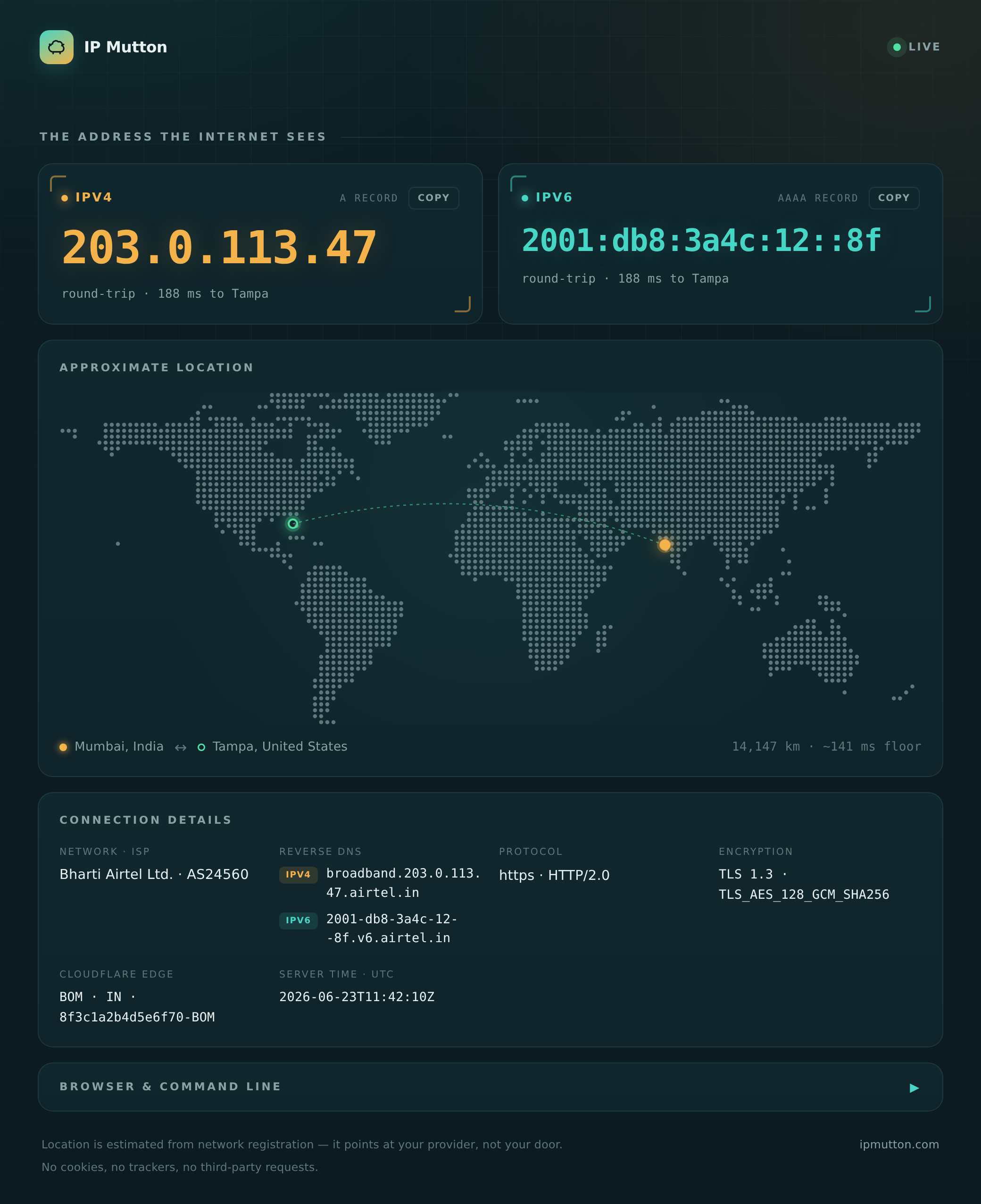
A few things that fell out of that goal:
- Real dual-stack. A single TCP connection is either IPv4 or IPv6, never
both — so a normal page can only ever show you one. IP Mutton publishes two
extra probe hostnames (
v4.ipmutton.com,v6.ipmutton.com) that are forced onto each family, fetches both, and shows you each address (or tells you honestly that you don’t have one). - A genuine round-trip number. The probe hosts hit the origin server directly (no CDN in the path), so the latency you see is really you ↔ the server, pinned on a map with the great-circle distance.
- Tiny and private. It’s a single ~12 MB Go service. Geolocation is a local, memory-mapped database, so your address isn’t shipped off to some third-party geo-IP API to look it up.
The part I’m most happy about: the JSON API
The pretty page is nice for humans, but the reason I reach for IP Mutton myself
is the clean JSON API. The same endpoint serves a browser an HTML page, but
hand it ?format=json (or hit /api) and you get a tidy, predictable snapshot
— perfect for scripts, monitoring, and CI.
curl 'https://ipmutton.com/?format=json'
# or the alias:
curl 'https://ipmutton.com/api'
The output is a single flat-ish object with sensible keys and real types
(numbers are numbers, missing values are null — not the empty strings or
stringified numbers you often get elsewhere):
{
  "ipv4": "203.0.113.10",
  "ipv6": "2001:db8:42::1",
  "address_family": "IPv4",
  "reverse_dns": "cpe-203-0-113-10.example.net",
  "geolocation": {
    "city": "Austin",
    "region": "Texas",
    "country": "United States",
    "country_code": "US",
    "postal_code": "78701",
    "time_zone": "America/Chicago",
    "latitude": 30.27,
    "longitude": -97.74
  },
  "isp": {
    "name": "Example Broadband",
    "asn": 64500,
    "network": "203.0.113.0/24"
  },
  "server": {
    "location": "Tampa, Florida, United States",
    "latitude": 28.01,
    "longitude": -82.49
  },
  "http_version": "HTTP/2.0",
  "scheme": "https",
  "tls_version": "TLS 1.3",
  "tls_cipher": "TLS_AES_128_GCM_SHA256",
  "server_time_utc": "2026-06-23T11:26:54Z",
  "cloudflare": { "ray_id": "a10323…-MIA", "colo": "MIA", "country": "US" },
  "browser": { "language": "en-US", "platform": "macOS" },
  "user_agent": "Mozilla/5.0 …"
}
Because each probe host is locked to one address family, you can ask for exactly
the one you want — and the unused family comes back null:
curl 'https://v4.ipmutton.com/?format=json'   # IPv4-only view
curl 'https://v6.ipmutton.com/?format=json'   # IPv6-only view
That makes the common one-liners trivial. Want just your public IPv4 for a
script? Pipe it through jq:
# Your public IPv4, nothing else
curl -s 'https://v4.ipmutton.com/?format=json' | jq -r .ipv4
# 203.0.113.10

# Your ISP and ASN
curl -s 'https://ipmutton.com/api' | jq -r '.isp | "\(.name) (AS\(.asn))"'
# Example Broadband (AS64500)

# Are you reaching the internet over IPv6 right now?
curl -s 'https://ipmutton.com/api' | jq -r .address_family
# IPv4
And if you don’t even want JSON — just running curl against the site (with no
flags) gives you a clean Unicode table, because the server notices the curl/
user-agent and formats accordingly:
┌───────────────┬─────────────────────────────────┐
│ FIELD         │ VALUE                           │
├───────────────┼─────────────────────────────────┤
│ IPv4          │ 203.0.113.10                    │
│ IPv6          │ 2001:db8:42::1                  │
│ Connected via │ IPv4                            │
│ Network CIDR  │ 203.0.113.0/24                  │
│ Reverse DNS   │ cpe-203-0-113-10.example.net    │
│ Location      │ Austin, Texas, United States    │
│ Server        │ Tampa, Florida, United States   │
│ ISP / Network │ Example Broadband (AS64500)     │
│ HTTP          │ https                           │
│ TLS           │ TLS 1.3                         │
│ Cloudflare    │ MIA · US · a10323…-MIA          │
│ Server Time   │ 2026-06-23T11:26:54Z            │
│ User Agent    │ curl/8.14.1                     │
└───────────────┴─────────────────────────────────┘
One URL, three audiences: a polished page for people, a clean table for the terminal, and structured JSON for machines — and not a single ad in sight.
Try it
Point a browser at ipmutton.com, or from a terminal:
curl ipmutton.com                       # the table
curl 'ipmutton.com/?format=json' | jq   # the JSON